RDH – Images in Futurism

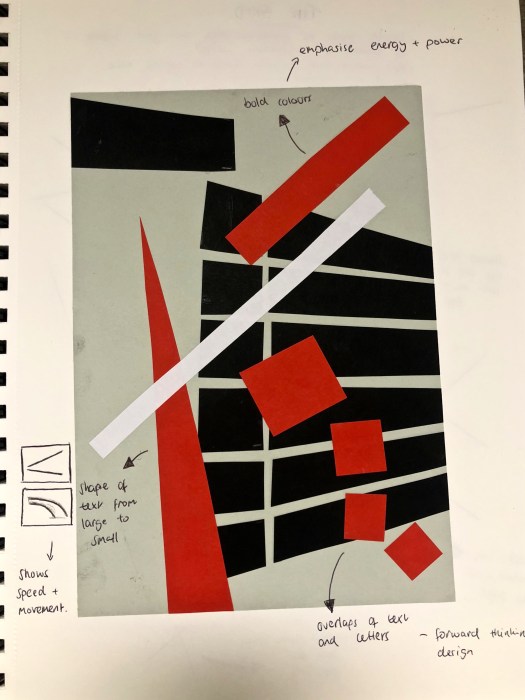
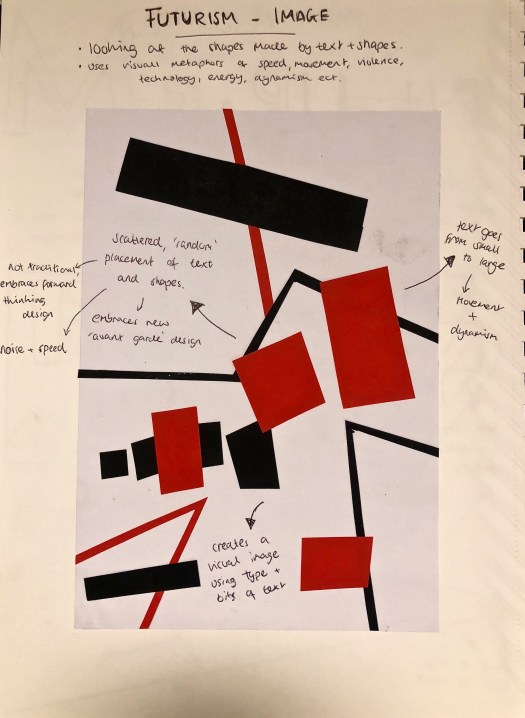
Futurism does not use photographs or drawings within it’s designs, instead designers of the Futurist era use text and shapes to create images. As shown in the posters below, the way the text and shapes are placed and layered on top of each other creates visual images. They use visual metaphors of speed, movement, violence, technology, energy, dynamism etc.

The scattered placement and overlapping text and shapes was very uncommon for the era of Futurism, it embraces ‘avant garde’ and forward thinking design. The ‘random’ and scattered effect also has connotations with noise and energy. The shape of the text moves from large to small or small to large and plays with the idea of speed and movement, with the text moving across the screen. The Bold colours colours used such as red and orange emphasise energy and power within the piece which are two of the main ideas of the Futurist movement.IMG_E0758IMG_0761

RDH – Type in Futurism

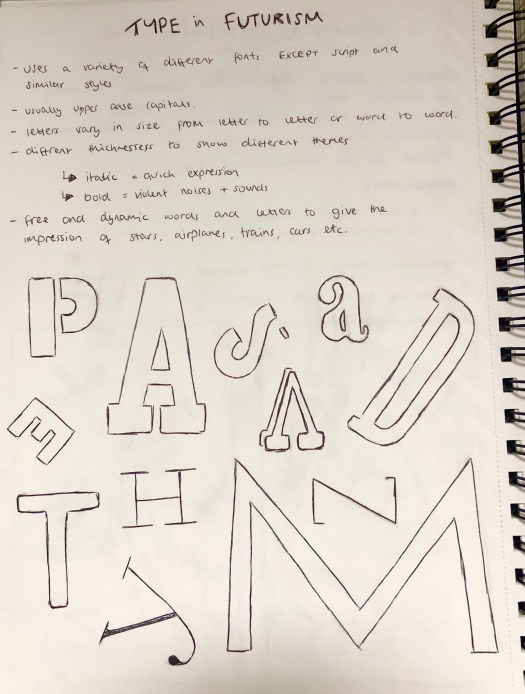
I researched into the type of typography used within the Futurism art movement for inspiration for my poster. After looking through previous designs I noticed that all of them use a variety of fonts within each word, other than script or similar styles. They usually only contain upper case letters for the main headers, however lower case letterforms are also used. Each word has a range of different sized letters as well as different thicknesses. Designers within the Futurism movement abandoned traditional uses of grammar and punctuation.

All of these features within Futurist designs create images with the typography and focus more on design than functionality. The free words and letters give the impression of trains, cars and movement.  I noticed that no words had a baseline so were not in a line, each letter is placed on different lines and appears to be random. This random placement breaks the symmetrical page and the grid system and makes the design look as if theres no real structure. Futurism was also the first ‘hand made’ looking art form so the text doesn’t look properly in line.  The scattered effect has connotations with noise and which is one of the main themes of Futurism, it also has connotations with movement as it looks like the letters are moving across the page as they get larger.

As well as looking into individual letterforms, I also looked into the shapes created by the words as a whole. As seen below in my sketchbook the word goes from small to large as it moves across the page. This gives a sense of movement and speed within the design.

IMG_0765IMG_0766


RDH – Image Metaphors

Today we looked at how metaphors within art and images convey different feeling and emotions within a piece. I learnt how to look past the obvious meaning of an image and look deeper to find hidden meanings, as well as how to use images to convey a message without the use of any words. Metaphors can be used in many different ways, for example politics, advertising, films etc.

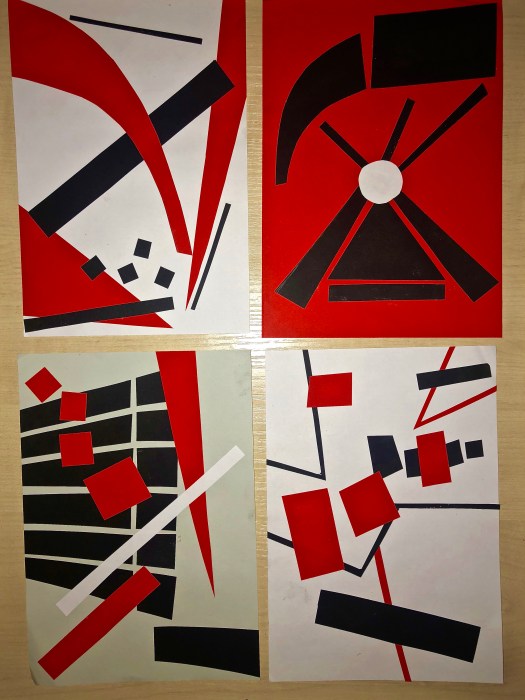
I then used the idea of visual metaphors to design 5, a45 poster designs using visual metaphors to design a poster about Futurism. Using different coloured paper, no text or images I designed my posters to include all the most important features of Futurism to give the essence of a poster created in the Futurism era. I used lots of bold colours, and put scattered boxes across the page to act as the ‘random’ text and shapes used in Futurist posters. Futurism is about speed and movement and I tried to convey that through the use of size in my poster. I also tried to convey the idea of nice within the poster using the scattered text and images.

I think this exercise was helpful in giving me ideas about my final poster design. It showed me how to take ideas of speed and movement and add them into my design using size, colour and the layout.

IMG_0750 (1)

RDH – Futurism

Futurism was an Italian art movement of the early twentieth century that aimed to capture in art the dynamism and energy of the modern world. The Futurist movement was founded by poet Filippo Tommaso Marinetti in 1909 after he published his Manifesto of Futurism on the front page of the Paris newspaper ‘Le Figaro.’ In Italy the weight of past culture was felt as particularly oppressive so Marinetti stated ‘we will free Italy from her innumerable museums which cover her like countless cemeteries’ and proposed that Futurism brings about a forward thinking world, creating art which celebrates the world of technology, speed and industry.

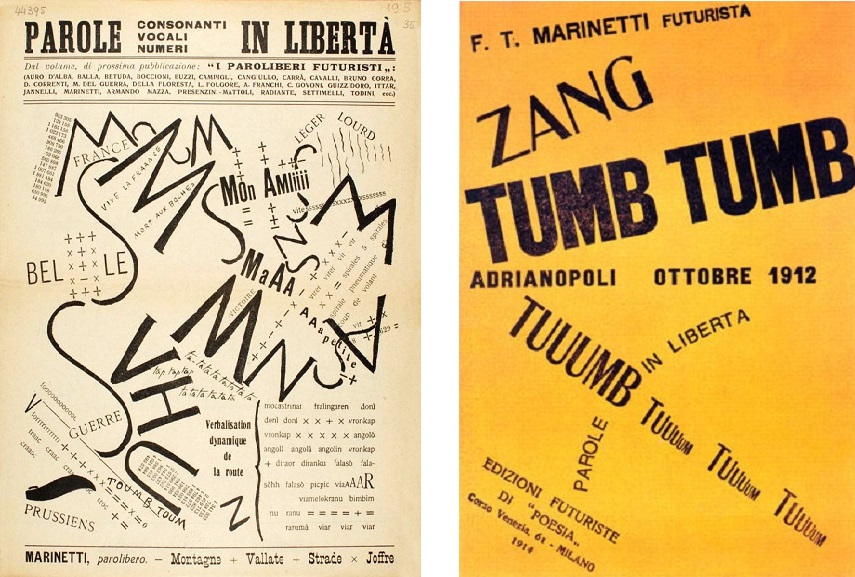
In 1909, Marinetti published the “Manifesto of Futurism” in Le Figaro, a Paris newspaper, which was more modern than anything of it’s time. Within the newspaper, Marinetti broke the symmetrical page using bits of type, articles, adverts and printer marks to create his work.

The typography which was used by the influential artists of the futurism movement broke the boundaries of traditional type design, as well as punctuation and grammar. Typography in the Futurist movement uses different fonts within each word, as well as a difference in scale with each letter, creating images through typography.

PHOTOS
Marinetti – Après la Marne, Joffre visita le front en auto (After the Marne, Joffre Visited the Front by Car), 1915. 
Marinetti – Cover of Zang Tumb Tuuum, 1914.
TEXT
http://www.designishistory.com/1850/futurism/
https://www.tate.org.uk/art/art-terms/f/futurism
Futurism (Movements in Modern Art series)


6 Word Stories

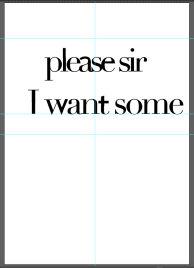
We were tasked with creating a 6 word story using typography, which encapsulated the essence of a book written by particular authors. I chose to do Oliver Twist by Charles Dickins using the quote ‘please sir I want some more.’

After some initial sketches I went onto adobe illustrator and started playing around the type, using 2 different typefaces to cut them up and put them back together to create a mix between the two.
Screen Shot 2018-10-03 at 14.04.58Screen Shot 2018-10-03 at 14.47.05

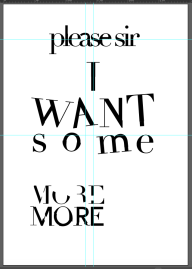
As you can see in most letters i have added parts of 2 different typefaces to create a different affect. For example, in the word ‘some’ I have added thicker lines from to the ‘m’ and the ‘o’, I did this to create a slightly jagged effect to convey the nervous thoughts that I would imagine Oliver having when asking for more food. I’ve also added the same effect to ‘WANT’ as well as adding it to capitals to outline how demanding the word want is. Both words are spaced apart randomly and slightly tilted to either side, this is another way to convey the thought of his being nervous and worried about using for more food.

After placing “please sir I want some” I created a hybrid font between the two typefaces for ‘more’.

Screen Shot 2018-10-03 at 15.00.28.png

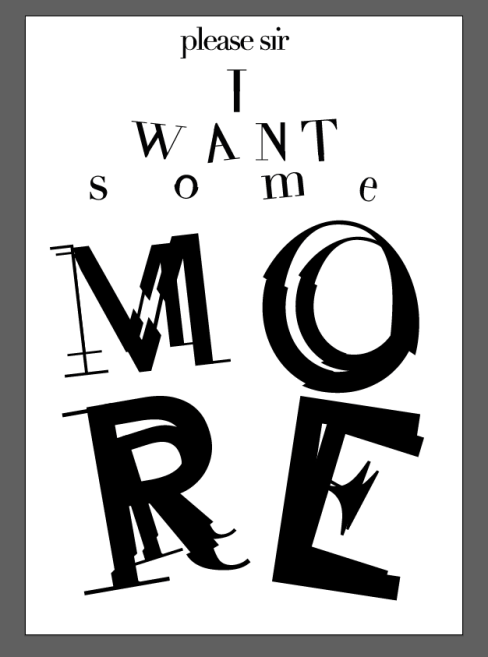
I decided to make the letters much more of a mix between the two typefaces and to show a lot of the hybrids with the jagged edges and misplacement. I think this is fitting with the word ‘MORE’ as it contrasts well with ‘please’ and looks more rough and rude. I moves the text around in a few different ways but thought the above layouts didn’t work well enough to convey the meaning. The draft above is effective but doesn’t use the space well enough and the word ‘MORE’ is too small, it should fill the space and be much bigger.
Screen Shot 2018-10-03 at 15.21.44.png

I enlarged ‘MORE’ and added more letters on top of the word to give the sense of literally having more on the page. I think it works much better to fill the space and works well to convey the feeling of the quote and the book in general. I think I could have experimented more with the layout so it doesn’t look so symmetrical, or added more hybrid fonts on some of the words. However, I’m happy with the outcome considering it was one of my first times using illustrator.
Indesign Workshop

Although I have used InDesign briefly before, our workshop on adobe InDesign was helpful and showed the basic set of skills we are required to use to create a piece of work, such as the grids, how to place images and text etc. I now know all the basic skills I need to use it and I’m looking forward to experimenting and learning more about the software and being able to use it to create work of a higher standard.

Asymmetric and Symmetric

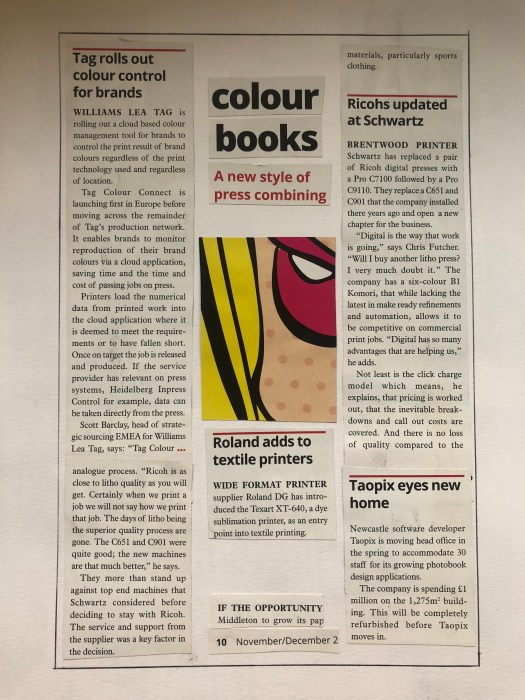
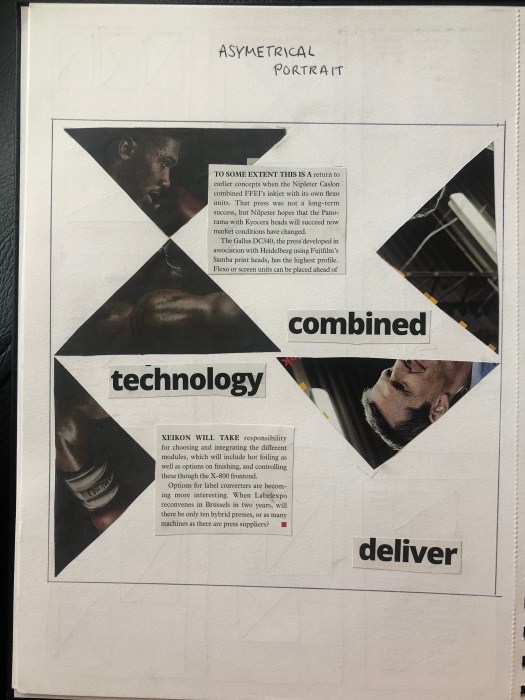
One thing that fascinates me about design and especially editorial design is the use of symmetry and asymmetry. The way you can use the same grid to create two different outcomes with different feels to both fascinates me. Both convey ideas in very different ways. While looking at the two different styles, we cut out text, images and headings from magazines and newspapers and used them to create rough design layouts.

An symmetric design tends to be used to create a much calmer and classic feel and usually doesn’t stand out as much, it is often easier to read the text. I think my design works well as the whole design is completely symmetrical and each body of text is easy to read. There is also a good sense of hierarchy and the path for the eye is clear and runs from the title and image through all the text. However the design isn’t as interesting to look at and is much more functional as a newspaper article than a page of eye catching design.

IMG_0708

On the other hand, an asymmetric design has less boundaries so tends to be much more playful and lively which usually creates much more eye catching designs, but can sometimes be much harder to read, especially when type is involved. Overall I think it works well to convey an asymmetric theme and is much more pleasing to look at. It’s much more lively and interesting, however the title being split into 3 separate parts could make it harder to read, therefor it wouldn’t be suitable for a novel or newspaper design.

IMG_0706


Design Layout

Looking at editorial design gave me a lot of insight into all the ways a magazine or book can be designed to make it easy to read and make it look great. The most useful thing i learnt was how to design something using balance and contrast to make a clear path for the eye and to add hierarchy to the piece, using an image or title.

I also learnt how to use typeset within my work to make it suit the type of work I’m designing. For example using centred text alongside larger typography to look classic and elegant, or using justified text to make it easier for the eye to follow it and read. This was useful as it means when designing in the future I’ll have an idea as to which is the best for different types of work, depending on the target audience and what the use will be for the work.

The grid system was another useful principle and learning how to use it showed me how to make the most out of a design, and how to use columns and hanglines within the grid make it functional giving the work a clear path for the eye.

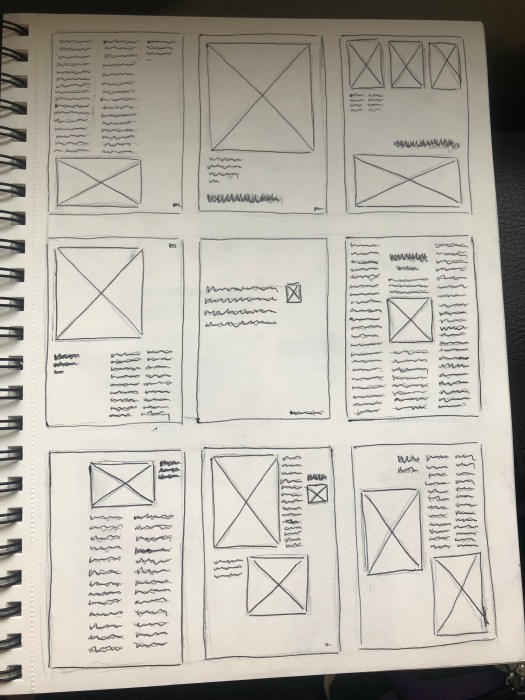
Following this we looked at design magazines and analysed them, looking for the ways they use all these features to create well designed work. I took sketches of the layouts so i could document them and identify everything we had learnt about.

IMG_0705


Jonathan Barnbrook

Jonathan Barnbrook was a British designer who studied at the Royal College of Art in London where he gained publicity for his innovative typography. After graduating he started his own studio where he took inspiration from Milton Glaser and Neville Brody.

His work was drawn from British influences and makes strong statements about war, consumerism, corporate culture and international politics, working both commercially and non-commercially. He uses originality with wit as well as irony in his work to create designs with strong political statements.

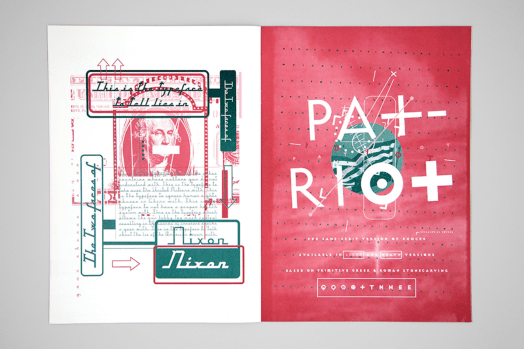
Barnbrook is best known for his interesting font names, such as Mason, Exocet, Bastard, Prozac, Nixon and Drone. He uses several layers in his work, using language and letterforms in harmony. His typefaces are full of personality, however they can be limited in their application because of this.

Overall I’m a big fan of his work and I love the way he layers his typography and images to create a sense of hierarchy and draw your eye to the text and images, as well as the bright contrasting.

barnbrook_work_06

Jonathan Barnbrook, Image source: barnbrook.net

Illustrator Workshop

I have learnt a little about illustrator previously at college through my graphic design course, however i only learnt basics and was advised to teach myself. It was useful to be taught about the fastest ways to manipulate text and use all the simple and basic tools.

After being given a project to do carry out on typography, I think the knife tool and the rubber tool have been the most useful and effective as they seem to be the easiest ways to cut up and manipulate text.

Overall I’d say I’ve learnt a lot about the basics, but I’m looking forward to learning about how to use more tools and knowing which tool to use for each piece of work I’m doing.

Design a site like this with WordPress.com
Get started